
Stay informed
Understand what is happening on your child’s Android device.
Parental Control App
MobDroid is a parental control app for Android that brings your child’s location and supported device activity into one private dashboard. Stay informed and build safer digital habits together.
24-hour free trial · No card required
Child’s Android device
Latest update available
Understand what is happening on your child’s Android device.
See useful location information when you need it.
Designed around lawful parental and authorized device use.
Important information without unnecessary complexity.
Review reported GPS locations, location history and supported device activity from a parent dashboard. Features depend on device compatibility, permissions and authorized setup.
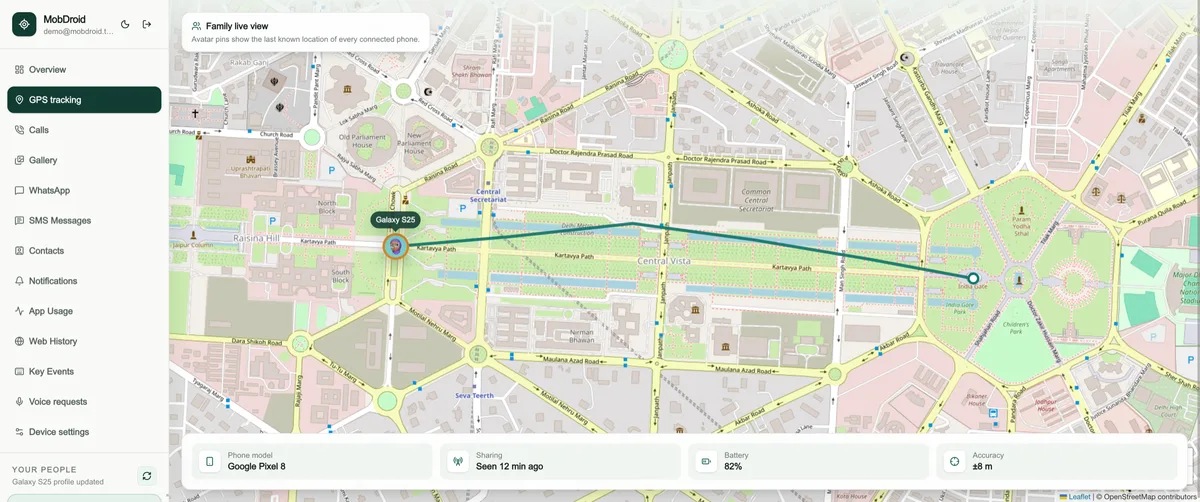
Track live device position on an interactive map with accuracy radius, speed, altitude, and battery percentage.
Review complete daily movement timelines, chronological route paths, stopover stay durations, and day start/end points.
Access complete logs for incoming, outgoing, and missed calls with contact names, phone numbers, duration, and timestamps.
Automatically record incoming and outgoing voice calls on the target device with high-clarity web audio playback and MP3 download.
Synchronize the complete phone contacts list including saved names, phone numbers, email addresses, and newly added contacts.
Read individual and group WhatsApp text messages, view sent and received media photos, and monitor active chat conversations.
Capture and listen to recorded audio files of WhatsApp voice call conversations directly inside your parent dashboard.
Monitor Telegram chat history, read text messages, view shared media files, and track incoming/outgoing conversations.
Track Instagram direct message exchanges, conversation threads, shared images, and sender profile details.
View Messenger chat logs, incoming and outgoing text conversations, contact names, and exact message timestamps.
Remotely command the phone microphone to record surrounding ambient audio for set durations (5, 10, 15+ minutes) on demand.
Take remote photos using the target device front or rear camera on demand without screen illumination or app popups.
Capture live screenshots of the active target device screen on demand to see what app or content is currently being viewed.
Record typed text and keypresses across all installed Android applications with input field context and exact timestamps.
View sent and received SMS text messages, message threads, sender numbers, and full text content in a organized view.
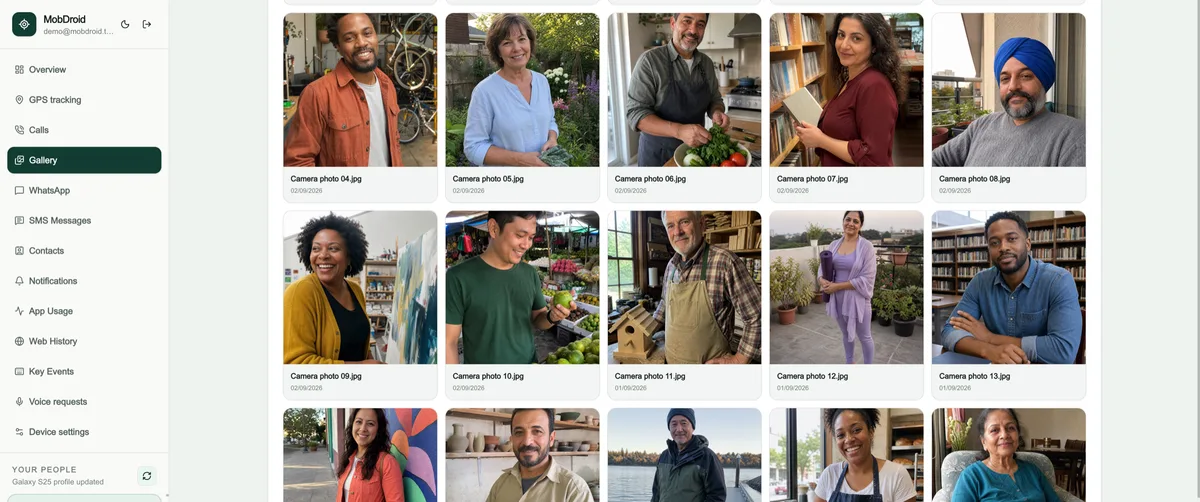
Browse synchronized device photos, camera captures, downloaded images, and WhatsApp media in a clean photo gallery.
Monitor daily app usage statistics, screen time breakdown, app launch counts, and inspect all installed Android applications.
Track visited website URLs, web page titles, search engine queries, visit frequency, and web access timestamps.
Intercept and log all device push notifications from social apps, system warnings, email apps, and chat notifications.
Remotely activate Lost Mode to lock screen with custom emergency contact message and trigger loud audible sirens to locate phone.
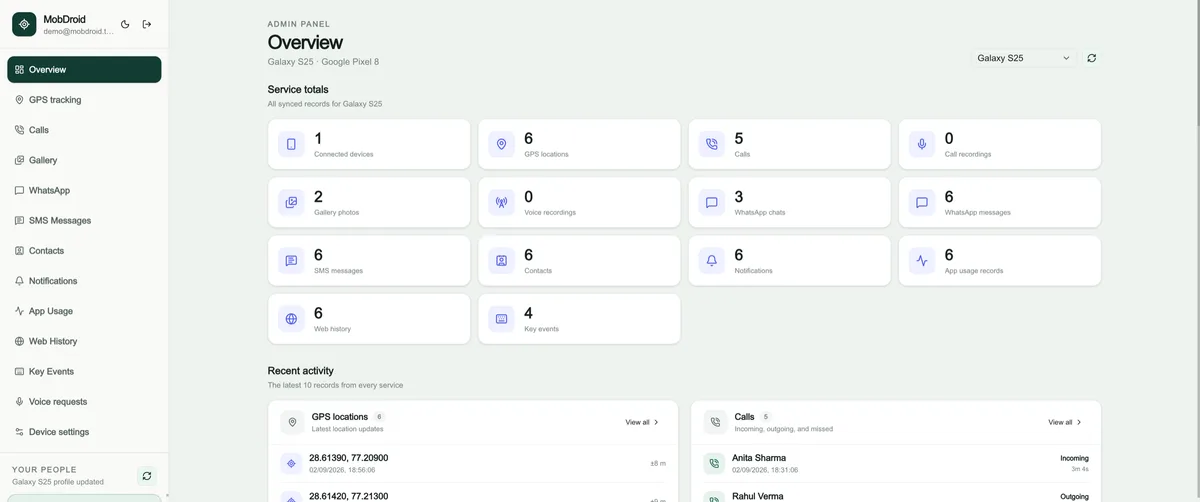
Explore real MobDroid views from the parent dashboard.
See connected devices and recent safety signals without searching through separate tools.
Setup is transparent, permission-led, and completed on the Android device you are authorized to manage.
01
Start your 24-hour evaluation and open your private MobDroid dashboard.
02
Install MobDroid on a device you own or are authorized to manage, then review each permission.
03
Use the parent dashboard to review available location and device activity information.
MobDroid helps parents understand important device and location information so they can have better conversations and respond when something does not look right.
Designed for lawful parental monitoring and family safety.
Test the experience, device compatibility, and available features before choosing a paid plan.
Explore first.
Purchase only when you are satisfied.
Paid licenses are non-refundable after purchase or activation, except where required by applicable law.
Read the refund policyFocused tools, a clear evaluation period, and a responsible approach to parental monitoring.
A focused Android companion app and responsive web dashboard.
Clear information designed to support responsible family conversations.
Dedicated views for location, activity, messages, media, and devices.
Test compatibility and available features before choosing a plan.
Account protection and an authorization-first product approach.
Contact MobDroid for setup, account, or policy questions.
Learn about setup, compatibility, the demo, and responsible use.
Contact SupportMobDroid is a parental control app for Android. Parents and guardians can review a child’s supported device activity and location in a private web dashboard after authorized setup.
The dashboard includes connected-device information, reported GPS locations, location history and supported device activity. Available information depends on the Android version, device settings, network connection and permissions granted during setup.
The companion app is built for Android, but feature availability varies by manufacturer, Android version and permissions. Use the 24-hour free trial to check your device before purchasing a membership. The companion app does not run on iPhone.
Create a parent account, verify your email and follow the Android installation guide. Use the trial to test device compatibility and the dashboard. No payment card is required to start.
Yes. You need access to an Android device you own or are legally authorized to manage. Install the companion app on that device and review the required permissions. A phone number alone cannot connect a device.
No. MobDroid requires authorized installation and device permissions. It does not bypass passwords or grant access to someone else’s phone without permission. Discuss monitoring openly and use the service only where you are authorized to do so.
Dashboard access pauses until a membership is activated. You can review the available membership terms and prices before submitting payment. Existing account data remains subject to the privacy and retention policy.
Choose a membership, follow the UPI payment instructions and submit your payment screenshot. Membership is activated after payment approval, normally within one hour. Check the approval page for your current status.
Review the refund and cancellation policy before paying. Paid digital memberships are generally non-refundable after purchase or activation, except where applicable law requires otherwise.
Visit our Contact Us page or email support@mobdroid.com. For setup steps, read the Android installation guide.